The decision rationale must tie back to the initial constraints. Without that, it is preference, not rationale.
A Brief Guide to Writing Design Documents
6 min readAsad Ullah
Designing a complex piece of software is hard. The requirements are vague, the options are many, and within an hour we are drowning in details i.e. security, data flow, APIs, trade-offs. The hardest part is to keep the high-level vision aligned with the gritty technical details. How do we make sure we are asking the right questions before any code is written?
This article presents a framework for managing the design phase, drawn from practice and from reading how other engineers approach the problem. It is half checklist and half mental reset. It forces us to focus on structure i.e. defining the boundaries, identifying the biggest technical questions, and systematically working through the trade-offs. We'll look at this framework one piece at a time.
What is a design document?
A design document is a detailed plan for how a piece of software should be implemented. It lays out all the components and processes which are needed to deliver the product.
What is the purpose of a design document?
A design document serves several purposes:
- It bridges the gap between what should be built and how it should be built.
- It helps to identify design issues early, while the changes are still cheap.
- It helps the team or organization to achieve actual consensus on the product's design. This is different from a verbal agreement, which usually falls apart in the first week of implementation.
- It distributes knowledge from senior engineers to junior engineers. Junior engineers learn how seniors think about trade-offs.
- It becomes the team's long-term memory of why each decision was made the way it was.
- A good design document also serves as a portfolio artifact for the designer who wrote it.
What is the structure of a design document?
There is no fixed template for a design document. The shape of the document depends on the design and the plan, both of which vary from project to project. However, the following sections show up in most design documents:
- Context and scope: The background facts about the project i.e. what exists today, what is changing, and why now.
- Goals (and non-goals) and scope: We should strictly specify what the product does or adheres to, and what is not a part of the plan. Goals can be split further into business goals and system goals i.e. SLAs, latency targets, throughput etc.
- System architecture: The system in its context i.e. how it fits into the larger systems around it, the major components and subsystems and how they relate to each other, and the design decisions and trade-offs at this layer. Diagrams should be included here.
- Data design: Storage, processing, data structures, and the overall data flow through the system. Validation and integrity rules also live in this section.
- API and interface design: API specification, message format, error handling, and authentication methods. It defines how the system integrates and behaves with other systems.
- Component design: Each major module is broken down by its purpose, responsibilities, inputs and outputs, algorithm, and dependencies.
- UI design: If the system has a user-facing element, it should also be included.
- Assumptions and external dependencies: The libraries and external systems which the design depends on, and the assumptions we are making about them.
- Regulatory and infrastructure constraints: Any constraints from compliance frameworks or hardware which limit the design space.
- Security considerations.
- Threat model and mitigation strategies.
- Testing strategy: How we will verify the correctness of the overall system and each individual module.
How to do research for a design document?
The section list is the easy part. The work which fills these sections is harder.
A useful way to get unstuck is to write a decision inventory before touching any of the section headers above. A decision inventory is a flat list of every unknown in the design. It captures every place where the answer is not clear, or where multiple defensible answers exist. One row per question.
A row in the inventory might look like this:
- Decision area: concurrency
- Open question: process per connection vs thread per connection vs thread pool
That is all the inventory pass requires. The goal is to name the problems, not to solve them yet.
Once the inventory is built, we should do two things with it:
- Classify each row by where it belongs in the design document i.e. system architecture, data design, a single module etc. Some items are pervasive and should be mentioned throughout the document, not only in their dedicated section. For example, security and authentication often overlap between system architecture and API specification.
- Research and resolve each decision. For each row, we should write the following:
- Practical options we are considering, and what is explicitly excluded
- Research findings i.e. specs, prior art, blog posts, other design documents
- The chosen option
- The rationale, tied back to the initial constraints of the project
- The trade-offs which we are accepting
- Any enhancement deferred to v2
The most important part here is tying the rationale back to the initial constraints. If the rationale could apply to any project, it is not really rationale, it is preference. The constraint anchor is what makes the document useful six months later when someone asks why a decision was made.
A practical example
Recently, we were redesigning the SSO setup of a product. The product has two front-ends i.e. an internal admin platform for staff users, and an external customer-facing portal. Both are fronted by Keycloak. The realm topology which we had in place was not giving us the session isolation we needed between the two.
The decision inventory for this design had several rows. Most of them were minor. The one which ended up structuring the rest was the question of how many Keycloak realms to run. The practical options were:
- One realm: simplest operationally, but cannot enforce the isolation between the admin platform and the portal which the goals demanded.
- Two realms: one for admin, one for portal. This felt obvious on the first pass.
- Three realms: a shared core realm, an internal realm, and a portal realm.
After mapping out the user populations and what each realm needed to enforce, three realms was the only configuration which fit without awkward exceptions. The rationale traced back to a single line in the goals section i.e. hard session isolation between the admin platform and the portal. Without the decision inventory, we would likely have shipped the two-realm version and discovered its problems in production.
Quick snapshot
Following is the whole framework as a flowchart. It serves as a quick reference for the order of steps.
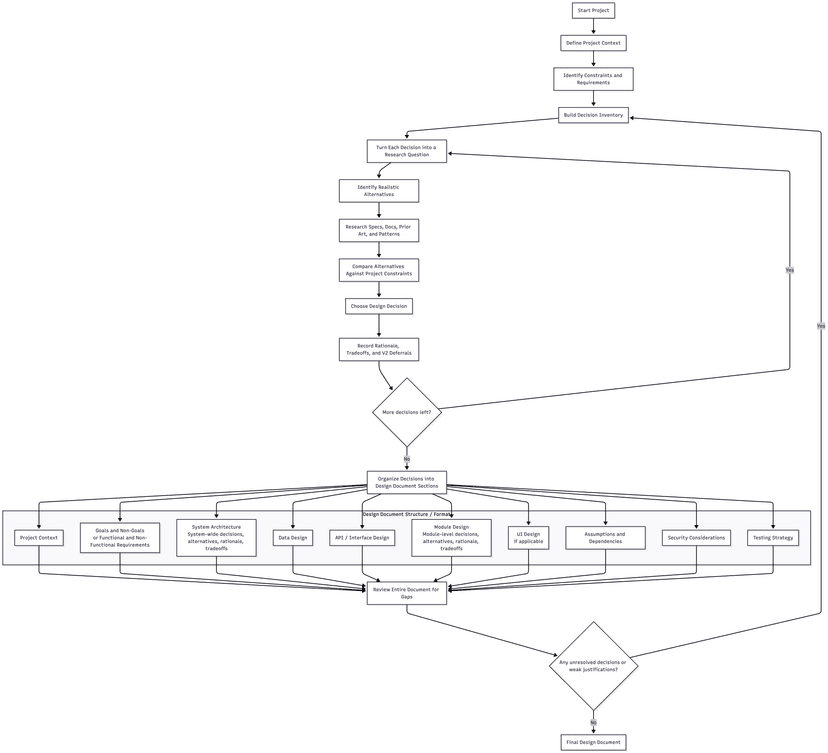
Summary
A design document does not make the design correct. It makes the design legible. There will still be projects where we write the whole document, get sign-off, and discover a month into implementation that something foundational was missed. The decision inventory catches most of the items, not all of them. However, when something does break, we find out faster, and we know which assumption it was. That is what we are paying for with the hours spent on the document upfront.
Share this article:
Back to top